
UnAIMyText vs editGPT: Which AI Humanizer Keeps Your Voice?
Written by
Alyssa Agas
Expert AI proofreader and creator of multiple AI writing and editing tools used by thousands of professionals. Specializes in building systems that make writing clearer, faster, and mistake-free.

UnAIMyText rewrites your whole draft in one free pass, while editGPT edits it as tracked changes you accept or reject one at a time.
If Turnitin or GPTZero flagged your writing, that difference decides how much of your own voice survives the fix.
UnAIMyText needs no signup and has a free Standard mode, plus an Ultra mode on its Pro plan, but it hands back a finished rewrite with no marked-up view of the changes. editGPT has a free tier plus paid plans, and it’s the better fit if you want to keep your voice and see exactly what changed.
Below, we compare how each tool rewrites text, what each one costs (free tiers included), and which situation calls for which.
Here’s the side-by-side first.
UnAIMyText vs editGPT: Quick Verdict
Choose editGPT if the draft is yours and you want a say in every edit. It proposes each change as a tracked edit, so you approve or reject them one by one before anything is final.
Pick UnAIMyText if you already have a finished block of AI-generated text and you want it humanized fast and for free. You paste it in, choose a mode, and read through the result. That works fine when you don’t need a line-by-line record of what changed.
What Is an AI Humanizer?
An AI humanizer is a tool that rewrites text so it sounds less like a machine wrote it. You paste in a draft, the tool reworks the wording and sentence structure, and you get back something that reads more naturally.
You’ll also see the same thing called an AI to human text converter. Different label, same job.
Some tools take a gentler route than a full rewrite. An AI proofreading tool like editGPT works on your existing draft and leaves the final call to you. We’ll get to how that works later.
How AI humanizers work
Machine-written text tends to have a very even rhythm. Sentences land at similar lengths, they’re built the same way, and the pacing barely shifts from one paragraph to the next.
But people are messier. We follow a long sentence with a short one, and we start a thought one way and finish it another.
Detectors like Turnitin and GPTZero measure that variation, so a humanizer goes straight at it. It changes sentence lengths, reorders clauses, and mixes up structure until the text varies the way a person’s writing does.
That’s the mechanism behind every tool in this category. The real differences come down to how each tool does it and how much say you get in the result.
What separates a good humanizer from a bad one
Three things matter most.
Meaning and voice
A good tool keeps what you said and how you said it. A bad one grabs unusual synonyms just to push a detector score down. The result often reads stranger than the original. For example, a casual blog post that suddenly calls a laptop a “portable computing device” doesn’t sound more human to anyone.
Visibility
You should be able to see what changed and adjust it. Some tools hand back a finished result, and your only options are to take all of it or toss all of it. That’s a frustrating choice when 95% of the rewrite is fine, and one sentence quietly changed your point.
Where it works
A tool that takes your file as it is and keeps your formatting saves you time. One that needs a copy and paste round trip every time slows you down, and on a long document that adds up fast. Pasting back and forth also tends to mess with your formatting.
Those three points are what we’ll use to compare the two tools below.
How UnAIMyText Works
The core mechanism
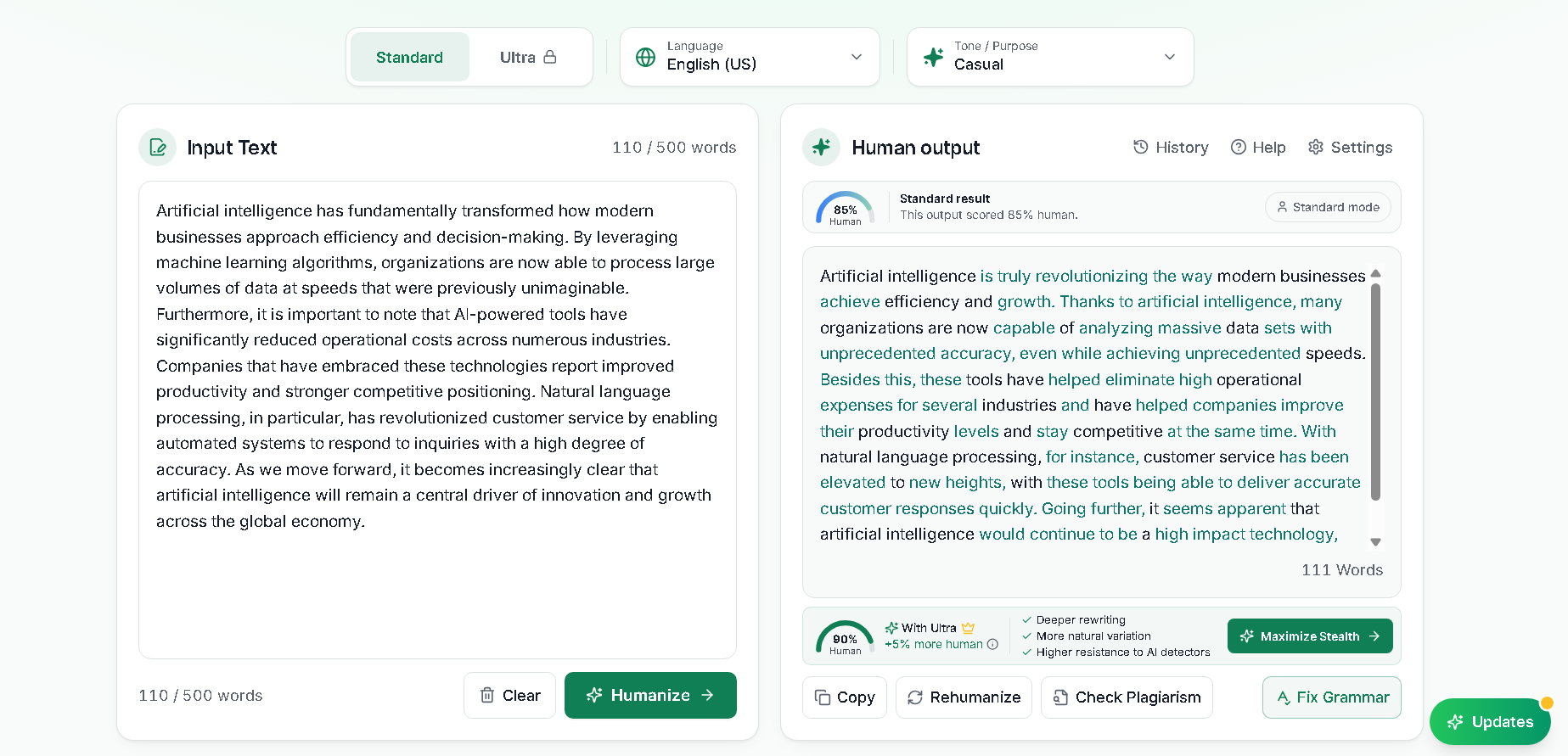
Using UnAIMyText takes about a minute. You paste your text into the editor, pick a mode, and hit Humanize.
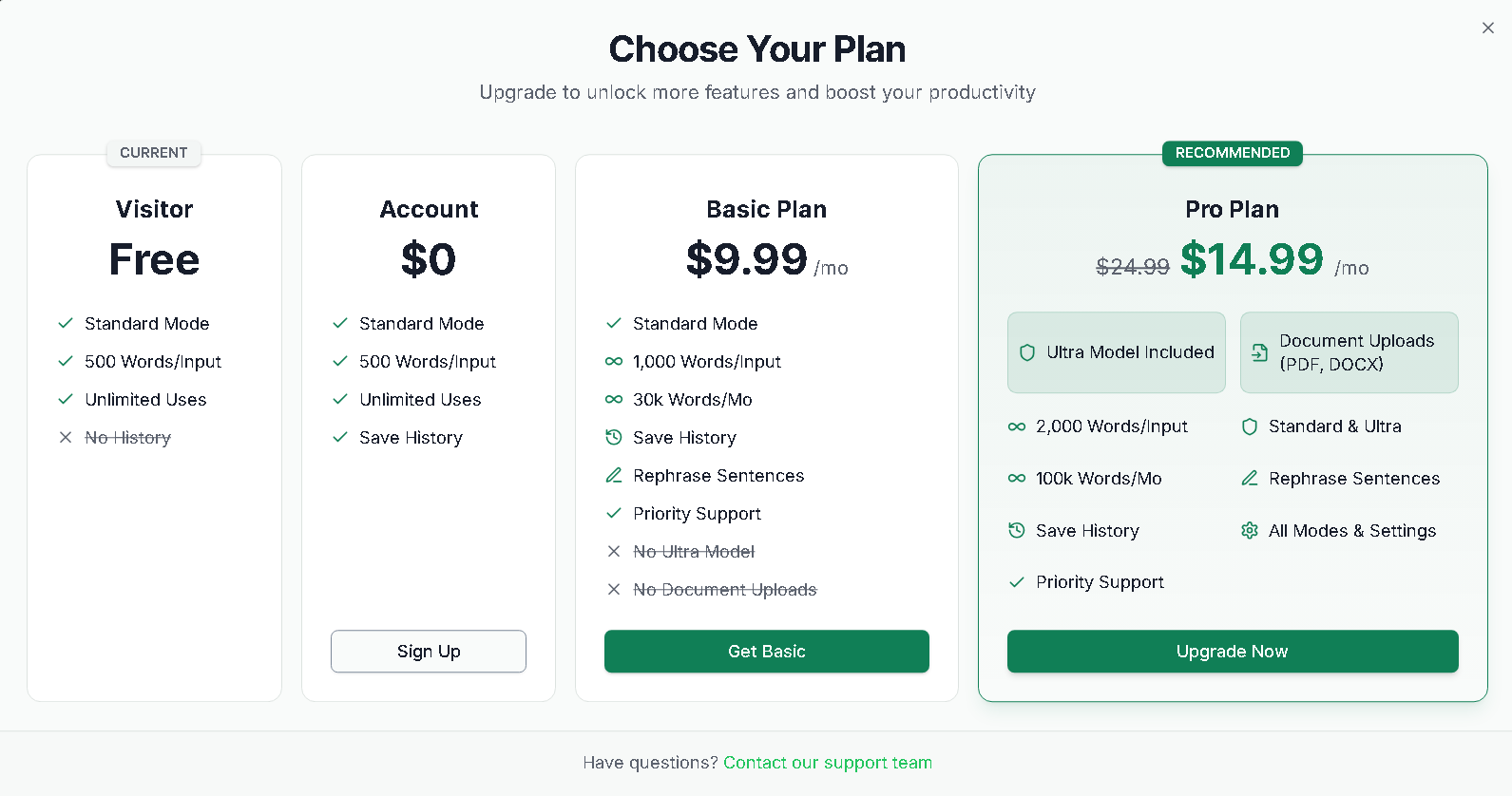
No account is needed. The free version takes up to 500 words per input, and there’s no cap on how many inputs you run.
There are two modes: Standard is the free one, and it’s pitched at everyday writing like blog posts and emails. Ultra comes with the Pro plan. It rewrites more heavily, handles inputs up to 2,000 words, and is aimed at academic and long-form work.
Before you run either one, you can adjust formality, emotional tone, and creativity.
Language support depends on the mode: UnAIMyText lists 30+ supported languages, and the free Standard mode covers 17.
UnAIMyText claims to bypass GPTZero, Copyleaks, and Turnitin and publishes monthly test results (its October 2026 run reports 96% to 98% pass rates for Ultra), though no tool can promise a score on every detector.
The trade-off
Free with no signup is a real advantage for a quick job. You paste, pick a mode, and have a result in seconds, and you can rerun the text for a different version.
The catch is what comes back: one finished rewrite.
Pro lets you rephrase a single sentence, but nothing marks what changed from your original, so you’re comparing the two by eye. That’s easy at 500 words and tedious on a full essay.
If you’d rather see every change before it counts, try editGPT. Each edit shows up as a tracked change that you accept or reject.
How editGPT Works
Editing in place, not regenerating
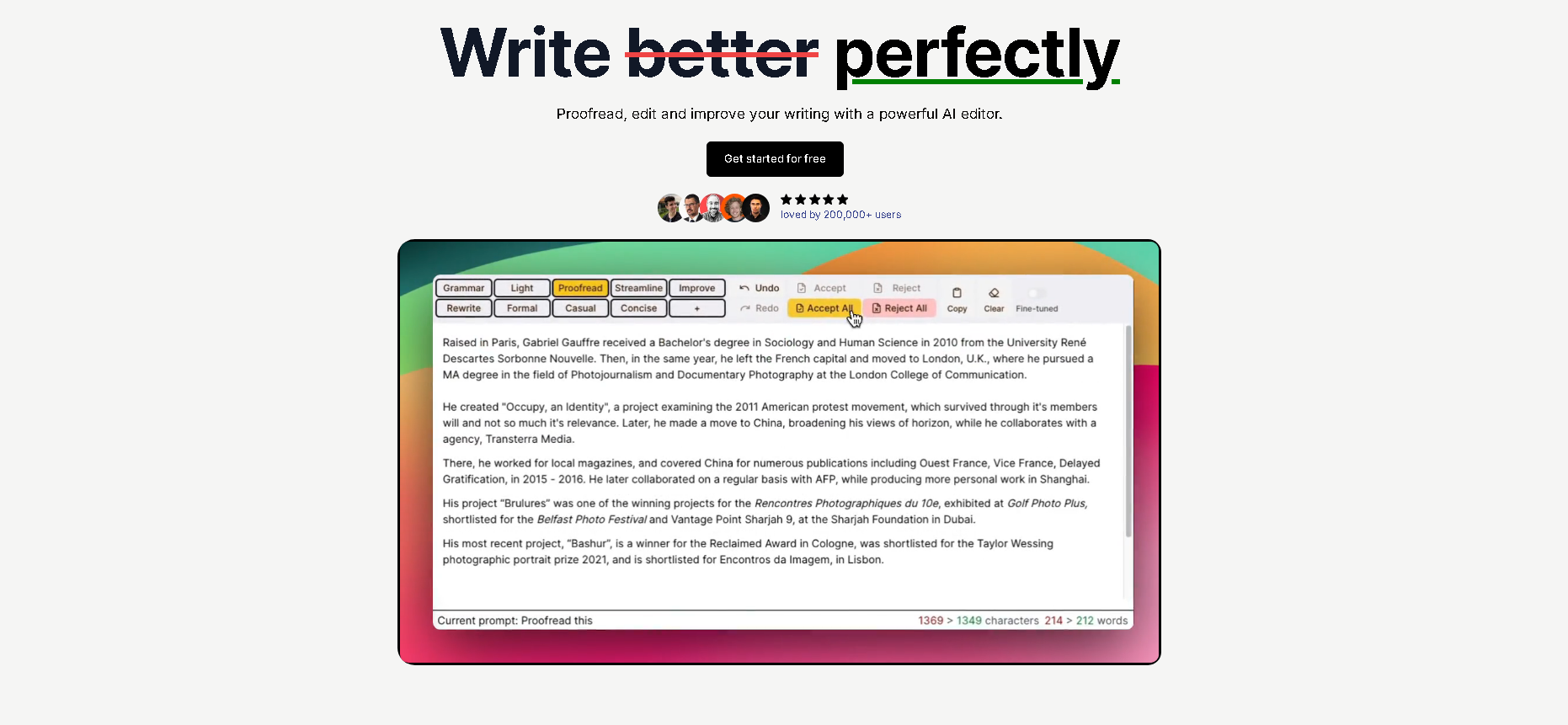
Most humanizers take your text, run it through a rewriting model, and hand back a new version. editGPT works on the draft you already have. It reads what’s there and proposes edits to it, so your original stays the base and the changes sit on top.
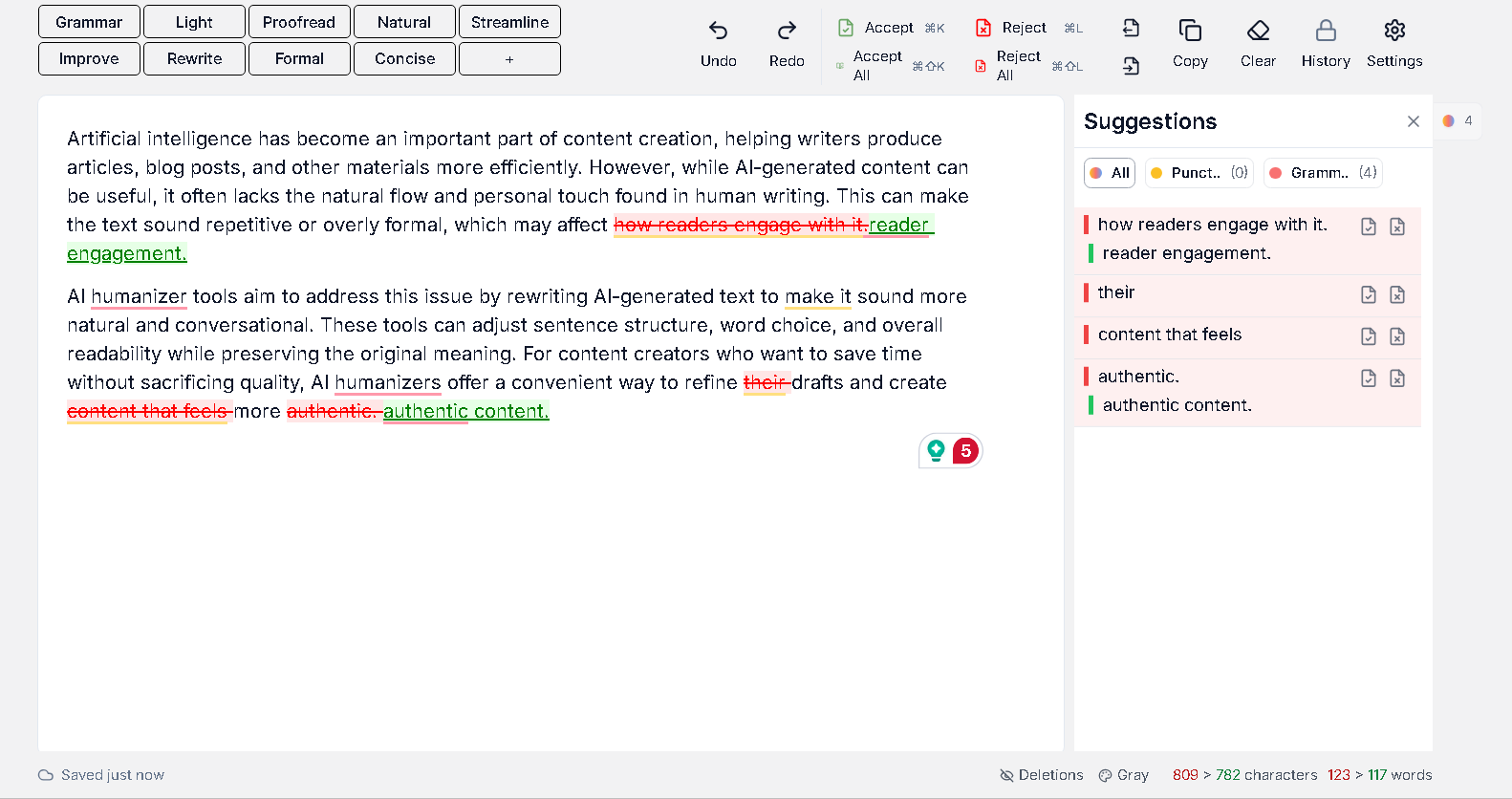
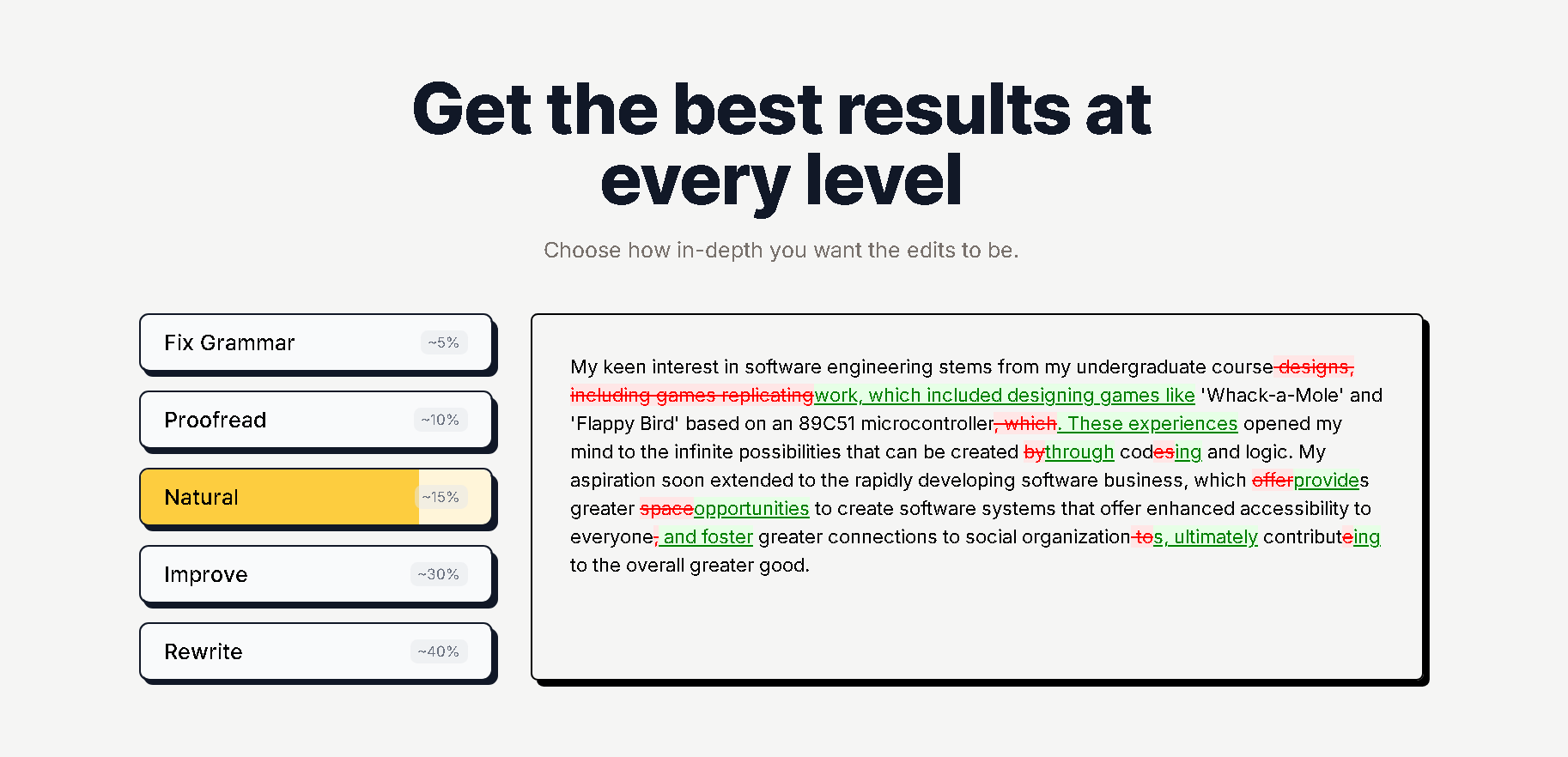
Each suggestion shows up as a tracked change, the same markup a human editor would leave in Word. You can accept it, reject it, or come back to it later.
Let’s say editGPT flips two clauses in a long sentence. If the new order reads well, accept it. If it buries your point, reject it and keep going.
Nothing is final until you say so. You review everything in editGPT’s standalone editor, which doesn’t need a ChatGPT account, and the same markup carries into Word when you export.
The rewriting itself is structural. editGPT reorders clauses and varies sentence length, which breaks up the even rhythm detectors pick up on.
You also pick how deep the edits go. Fix Grammar makes minimal changes, while Rewrite can reshape sentence structure entirely. If you’ve had a draft flagged by Turnitin and GPTZero, you can start light and move up only as far as the draft needs.
Word workflow, batch editing, and multi-language support
If your draft lives in Word, the workflow is a simple round trip. You paste your text, or upload a .docx file on paid plans, and review editGPT’s edits in its editor. Then you export a .docx that carries them as native Word markup.
Tracked changes in Word are preserved throughout, and so is your formatting, including bold, italics, headings, and lists. Open the exported file in Word and review it like any document someone else has edited.
Longer documents are what Project Mode is for. It’s built for essays, reports, and manuscripts, and it applies batch edits across the whole document with the tracked changes intact. It comes with the paid plans.
editGPT also covers more than 80 languages and detects the language automatically. This helps ESL writers, whose drafts often need work in a second language.
Detectors are a real concern for this group. A 2023 Stanford study in Patterns tested seven GPT detectors on 91 TOEFL essays by non-native English writers and found they wrongly flagged more than half as AI-generated.
Multi-language support is included on the free plan too.
Pricing
editGPT has a free plan, and it’s a usable one. You get 20,000 words per month, and up to 600 words per document, with a three-document limit. It includes accept-and-reject tracked changes and multi-language support so you can try the workflow on shorter pieces.
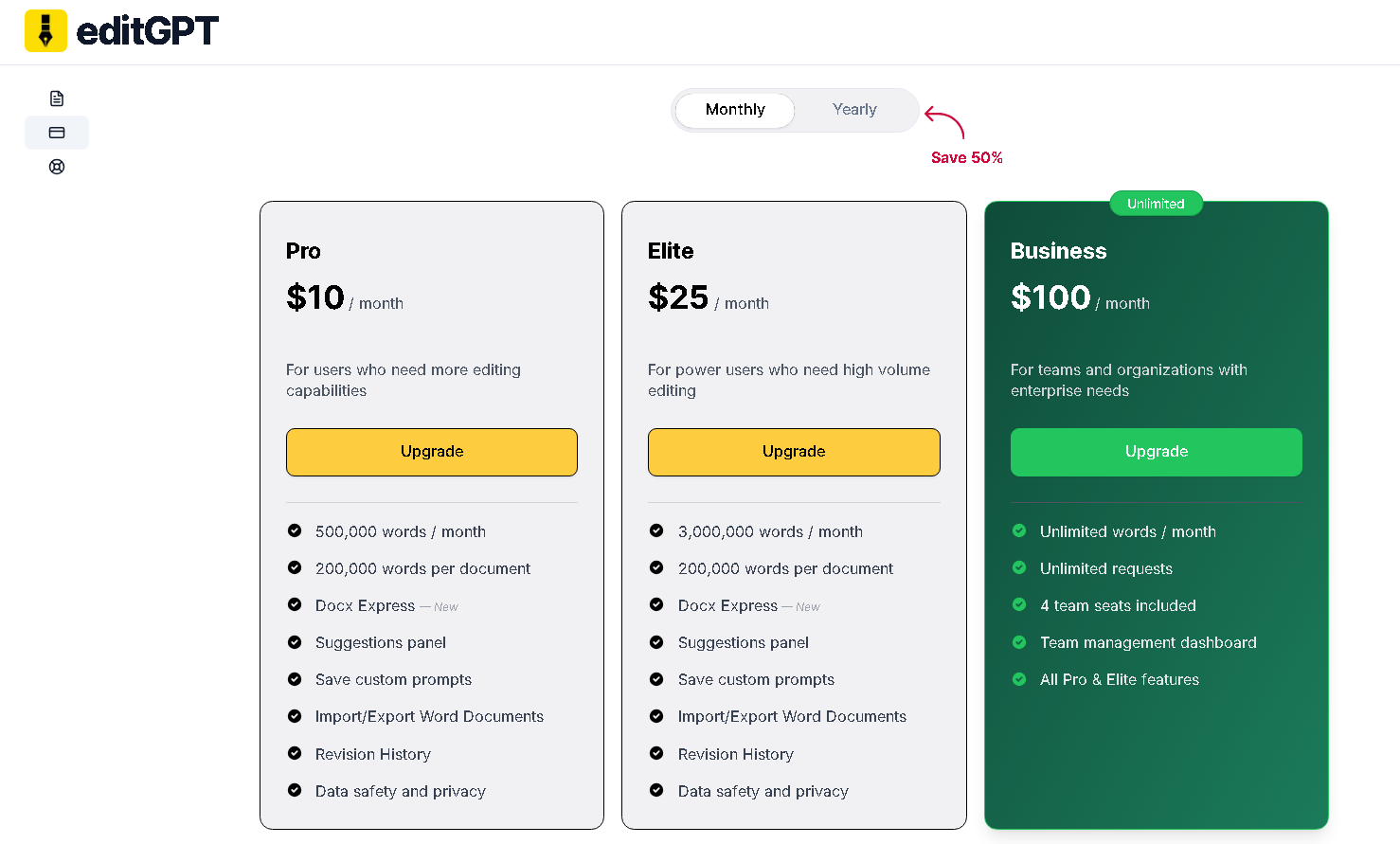
Pro is $10 per month and Elite is $25 per month, with lower rates on annual billing. Pro includes 500,000 words per month and Elite includes 3,000,000, with up to 200,000 words per document on both.
Both add Word import and export, a suggestions panel, custom prompts, and revision history. A Business plan at $100 per month adds unlimited words and four team seats.
Pros and Cons
Both tools do well at what they’re built for. Here’s where each one shines and where it falls short.
editGPT
Pros
- Every change is a tracked edit, so you accept or reject each one yourself.
- The free plan is real: 20,000 words per month, up to 600 words per document, with the accept-and-reject view included.
- Project Mode applies batch edits across long documents and keeps the tracked changes intact.
- Word files go in and come out with native tracked changes.
- It’s a standalone web editor, so no ChatGPT account is needed. A Chrome extension also works inside ChatGPT, where it shows what changed between your input and ChatGPT’s output.
- It supports more than 80 languages, which helps ESL writers.
Cons
- Reviewing changes one at a time takes longer than a one-click rewrite. But that’s the cost of having control.
UnAIMyText
Pros
- It’s free with no signup, no credit card, and no total word cap.
- It’s fast. You paste, pick a mode, and click, and you can rerun the same text for a different variation.
- You get Standard and Ultra modes plus tone settings.
- A free account saves your session history.
- Pro adds sentence-level rephrasing and 2,000-word inputs, and you can upload PDF and Word files.
Cons
- There are no tracked changes. You get one finished block, so checking it against your original means comparing by eye.
- Free inputs cap at 500 words, so a longer document has to be run in pieces.
- Ultra mode is Pro only.
- Sentence-level rephrasing is also Pro only.
Who Should Use editGPT
editGPT fits best when the draft is yours and you want it to stay yours. Here are the people it tends to work well for.
Writers with a flagged draft
Say you used AI to get past a blank page, then rewrote a good chunk yourself. A detector still marks it. Running the whole thing through a one-click rewrite can change your phrasing in places you liked.
With editGPT, you see each proposed edit and keep the ones that sound like you. Your tone stays intact, and the stiff, even rhythm that gets drafts flagged by Turnitin or GPTZero is what gets reworked.
Students
If an essay needs to read more naturally, you’ll want to understand what changed before you hand it in. Tracked changes make that easy. You can read each edit, see why a sentence moved, and stand behind the final version because you approved it.
ESL writers
Drafts in a second language often need the most care. A rewrite tool can swap in phrasing that sounds polished but isn’t how you’d say it. editGPT supports more than 80 languages, so you can work in the language you’re actually writing in.
FAQ
Is it safe to use an AI humanizer on schoolwork or client work?
It depends on the policy of whoever you’re writing for. Many schools and clients allow AI-assisted drafts but set their own rules, so check their AI-use policy first and disclose AI help if they require it.
Can UnAIMyText or editGPT guarantee I’ll pass an AI detector?
No. No AI humanizer can guarantee a pass on every detector, because Turnitin, GPTZero, and others update their models regularly. UnAIMyText says the same on its own site. What you can control is reviewing each change, which editGPT’s tracked edits let you do.
Is UnAIMyText really free with no catch?
Mostly, yes. UnAIMyText’s free tier needs no signup or credit card and has no total word cap, but each input is limited to 500 words. Pro adds extras like sentence-level Rephrase, but nothing marks up what changed.
Is UnAIMyText better than editGPT for bulk jobs?
For long documents, editGPT is the better fit. Its paid plans take up to 200,000 words per document, and Project Mode applies batch edits across the whole file with tracked changes intact. UnAIMyText has no total word cap, but inputs stop at 500 words on the free tier and 2,000 on Pro, so a long document means pasting it in pieces.
Final Verdict
Both tools do what they promise, and they promise different things.
UnAIMyText is a free, fast way to get a finished rewrite, with no signup and no total word cap as long as each input stays under 500 words. For a quick pass on a short block of text, that’s a good deal.
A flagged draft usually needs more than one pass, though. You want to know what changed, keep the lines that sound like you, and undo the ones that don’t.
That’s where editGPT pulls ahead.
Every proposed edit is a tracked change, so nothing reaches your final draft without your say, and it works through a standalone web editor and a Word round trip with native tracked changes.
If speed on a short text is your priority, UnAIMyText will do the job. If the writing is yours and you want it to stay that way, editGPT is the stronger pick for essays, articles, and drafts in your second language alike.
Recommended Reading
8 Best AI Humanizers To Bypass Turnitin and GPTZero in 2026 (Tested & Ranked)
Humbot vs editGPT: Which AI Humanizer Actually Works?
7 Best Tools to Humanize ChatGPT Text in 2026 (Tested for Natural, Undetectable Writing)
Best Undetectable AI Alternatives in 2026
Best QuillBot Humanizer Alternative (Tested)
7 Best ZeroGPT Humanizers in 2026 (Tested & Ranked for Writers)
