
Track Changes in Word with AI
editGPT uses the same track changes interface as Microsoft Word. Edit with AI, export to Word, and keep all your changes intact.
Try it free


From editGPT to Word—Seamlessly
Your track changes look the same in both applications. No surprises, no reformatting needed.
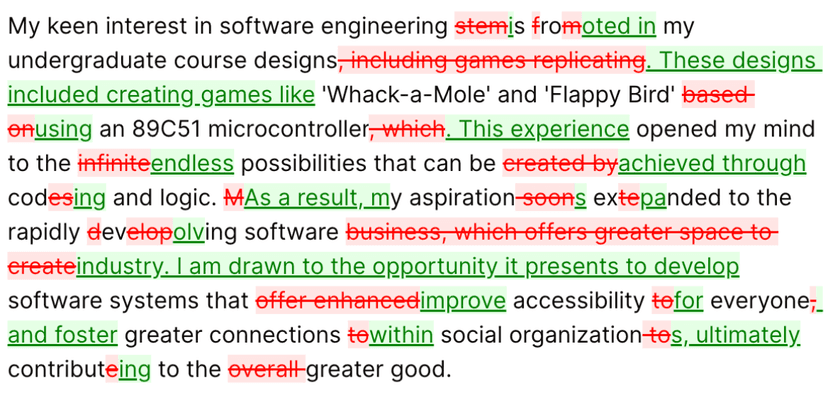
editGPT
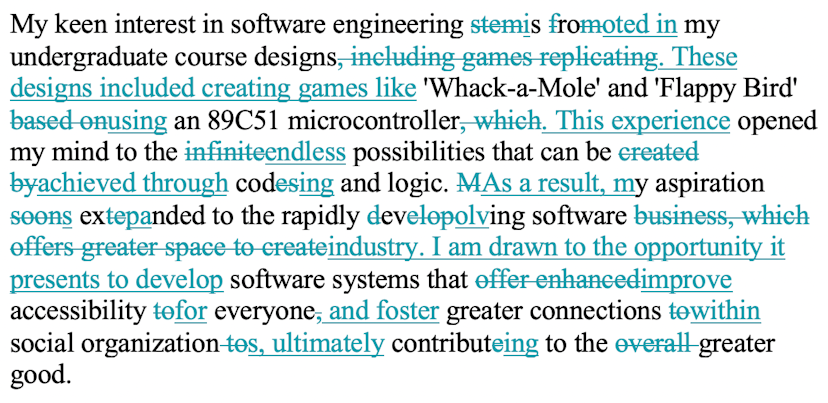
Microsoft Word
See How It Works
Watch how to export your AI edits to Word while maintaining all your styles and track changes.
Trusted by 200,000+ Writers
How It Works
Paste or Import Your Text
Copy from Word or upload your .docx file. editGPT preserves your formatting.
Edit with AI
Run your edits. See every change highlighted with familiar track changes.
Export to Word
Download as .docx with track changes intact. Open in Word and review.
Built for Word Users
If you use Microsoft Word, you'll feel right at home with editGPT.
Same Track Changes You Know
editGPT uses the exact same track changes interface as Microsoft Word. Strikethrough for deletions, underline for additions—nothing new to learn.
Export with Changes Intact
Download your edited document as a .docx file with all track changes preserved. Open in Word and continue reviewing exactly where you left off.
Accept or Reject Individually
Review each AI suggestion one by one. Keep the changes you like, reject the ones you don't. You're always in control.
Preserve Your Formatting
Bold, italics, headings, lists—all your formatting survives the round trip. Edit in editGPT, export to Word, share with your team.
Import from Word
Paste directly from Word or upload .docx files. Your formatting comes along for the ride.
Collaborate with Editors
Send your AI-edited document to human editors with track changes they can review in Word. Perfect for professional workflows.
Why Track Changes Matter
Transparency—See exactly what the AI changed, word by word.
Control—Accept or reject each edit. Keep your voice intact.
Collaboration—Share with editors who can review in Word.
Learning—Understand how AI improves your writing over time.
The Problem with Other AI Tools
ChatGPT gives you rewritten text with no way to see what changed.
Most AI editors don't export to Word at all.
Formatting gets lost in translation between apps.
No way to collaborate with human editors on AI changes.
Frequently asked questions
Ready to Edit with Track Changes?
Join 200,000+ users who edit with AI and export to Word seamlessly.
Get started for free