
BypassGPT vs editGPT: Which Is the Best AI Humanizer?
Written by
editorial Rankingonai
Expert AI proofreader and creator of multiple AI writing and editing tools used by thousands of professionals. Specializes in building systems that make writing clearer, faster, and mistake-free.
BypassGPT is an AI humanizer that rewrites your text in one pass, aiming to get it past detectors like GPTZero and Turnitin. editGPT works on the text you already have and shows every change as a tracked edit, which you accept or reject yourself.
That makes editGPT the better fit if you have to stand behind the final text, such as students submitting work, writers, and marketers publishing under their own name. BypassGPT is the quicker route when moving a detector score is the only goal.
We compared the two on control, free limits, pricing and output quality.
Here’s how they stack up.
BypassGPT vs editGPT: Quick Verdict
The BypassGPT AI humanizer and editGPT solve different problems, so the right pick depends on what you need back.
editGPT fits better if you’re editing your own work and want to approve every change before it’s final. BypassGPT is the better option if you have a block of AI text and want a fast rewrite with a detector score attached.
The difference between the BypassGPT AI humanizer and editGPT is what comes back. A BypassGPT humanizer rewrite is a new block of text. editGPT returns your own text with every change marked, and you decide what stays.
What Is BypassGPT?
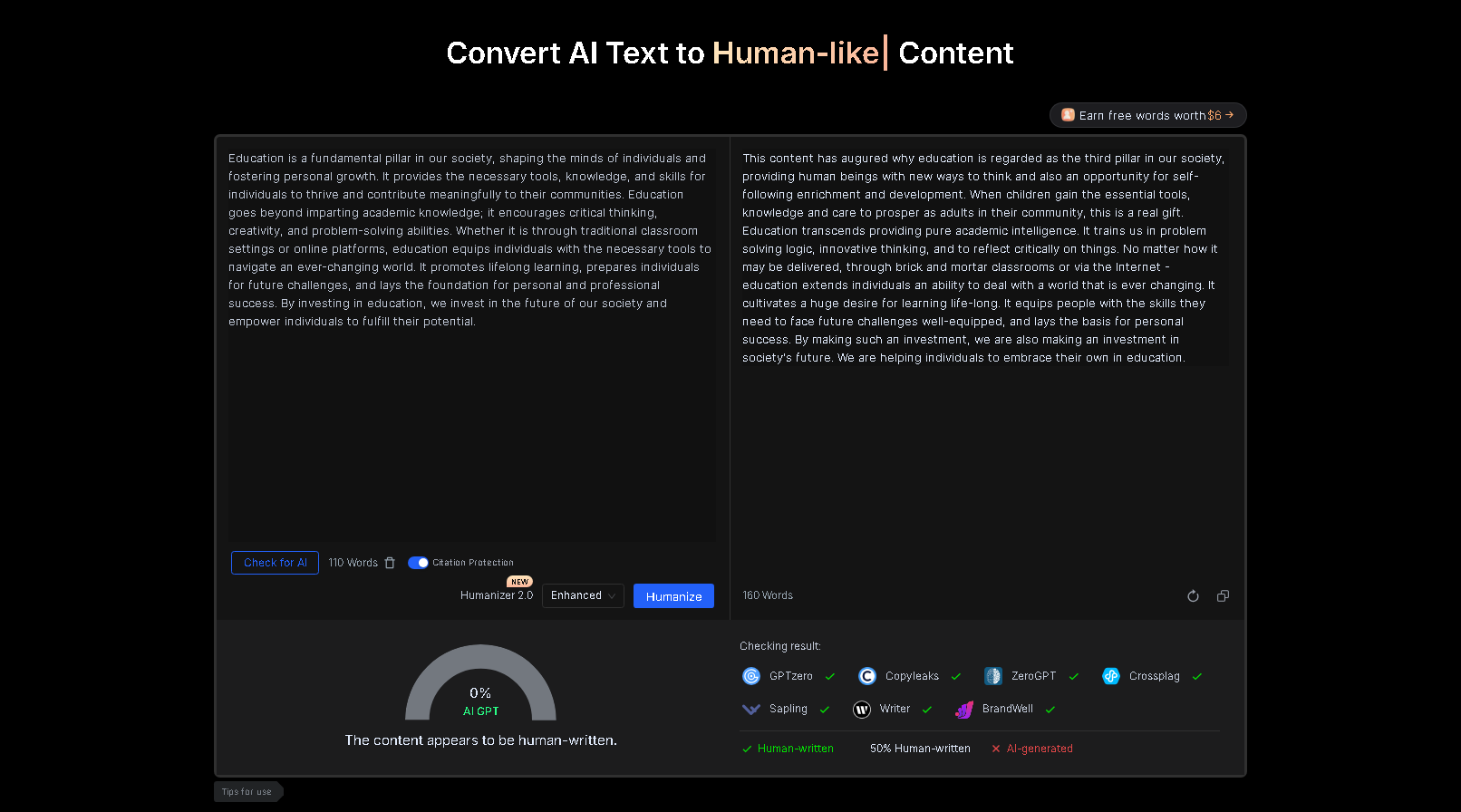
BypassGPT is an AI humanizer that does one job. You paste in AI-written text, and it hands back a rewritten version meant to slip past detectors. The rewrite happens in a single pass, with no edit trail to review.
Core features
The BypassGPT AI tool calls itself an “AI Detection Remover.” It rewrites text in three modes (Fast, Creative and Enhanced), and all three come with every plan, including the free one.
A built-in AI checker scores each rewrite right away. Around that sit an essay generator, a set of rewriters, an Android app and an API.
BypassGPT says that its output gets past “all basic AI detectors,” Turnitin and Originality.ai Turbo 3.0, and that it removes ChatGPT watermarks. Those are the company’s own claims. If you’re comparing approaches, our guide on how to humanize ChatGPT text covers other ways to get a draft sounding natural.
A tip: searching for Bypass GPT turns up several similarly named tools and apps, so make sure you’re on the right one before you pay.
Does BypassGPT really work?
Results are mixed. Trustpilot shows a 3.0 average across 300 reviews, split between five-star ratings (38%) and one-star ratings (34%), as of November 2026. Reviewers praise the simple interface and quick support replies, and the complaints center on output quality and refunds.
The one independent test we found leans the other way. Originality.ai, which sells its own detector, ran a ChatGPT article through BypassGPT in a review dated October 2025 and reported little to no effect on three of the four detectors it used.
GPTZero still scored the rewrite 93% AI, while Copyleaks and Originality.ai both scored it 100% AI. That’s a single sample, so it’s best treated as one data point.
Output quality is the other issue. WriteHybrid’s 2026 review of BypassGPT reports that users run into stray characters, out-of-place capitals and words that don’t fit the sentence, and it recommends proofreading before use. WriteHybrid sells a competing tool, so keep that in mind.
Trustpilot reviewers describe similar problems, such as results that don’t use standard English.
Turnitin is where the pattern shows most. It updated its detector on August 27, 2025 to catch text run through humanizer tools, according to Bristol University’s notice.
Turnitin told EdTech Innovation Hub that the update targets leading bypassers. Several Trustpilot reviewers said BypassGPT stopped passing right afterward, including this review from August 29, 2025.
That’s the catch with any tool sold on detector scores: it depends on the next detector update. Reading through BypassGPT reviews, it’s the pattern we’d weigh most. If scores are your main worry, we wrote a separate guide on how to bypass AI detection.
BypassGPT pricing and refund policy
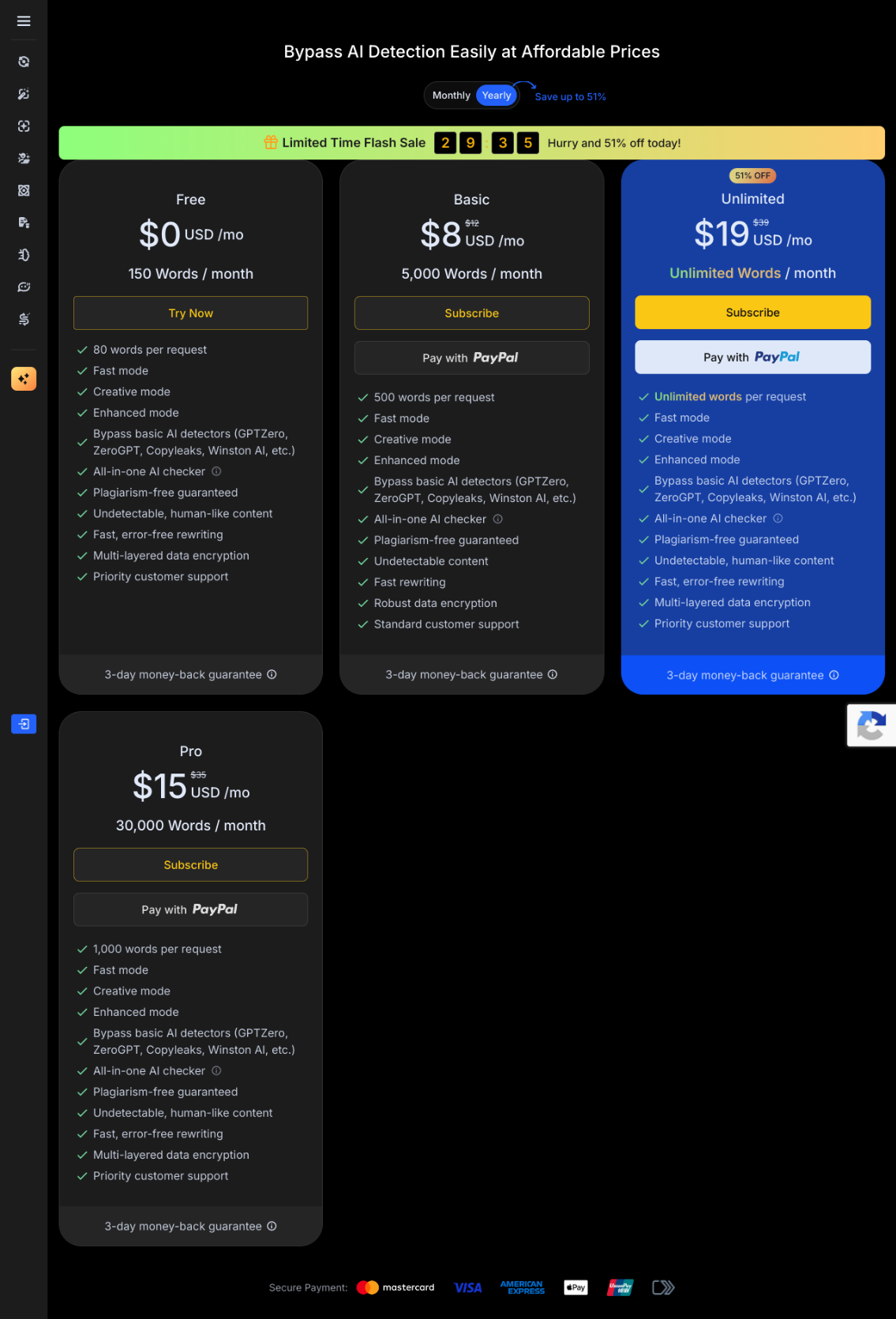
BypassGPT has a free plan and three paid tiers.
These are the standard USD prices listed as of November 2026, with the yearly billed rate in brackets:
- Free: 150 words a month, 80 per input.
- Basic: $12/month ($8/month billed yearly), 5,000 words a month, 500 per input.
- Pro: $35/month ($15/month billed yearly), 30,000 words a month, 1,000 per input.
- Unlimited: $39/month ($19/month billed yearly), no caps.
The BypassGPT free plan is a standing plan, not a trial. Still, 150 words a month covers roughly one short paragraph.
Refund requests have to be made within 3 days of purchase, and they’re off the table once you’ve used more than 1,000 words. Subscriptions renew automatically, so you need to request cancellation before the renewal date. A proper test on a longer draft can use up that 1,000-word limit fast.
How editGPT Works
editGPT is an AI proofreading tool. You give it text, choose how much to change, and it marks every change for you to accept or reject.
Editing in place, not regenerating
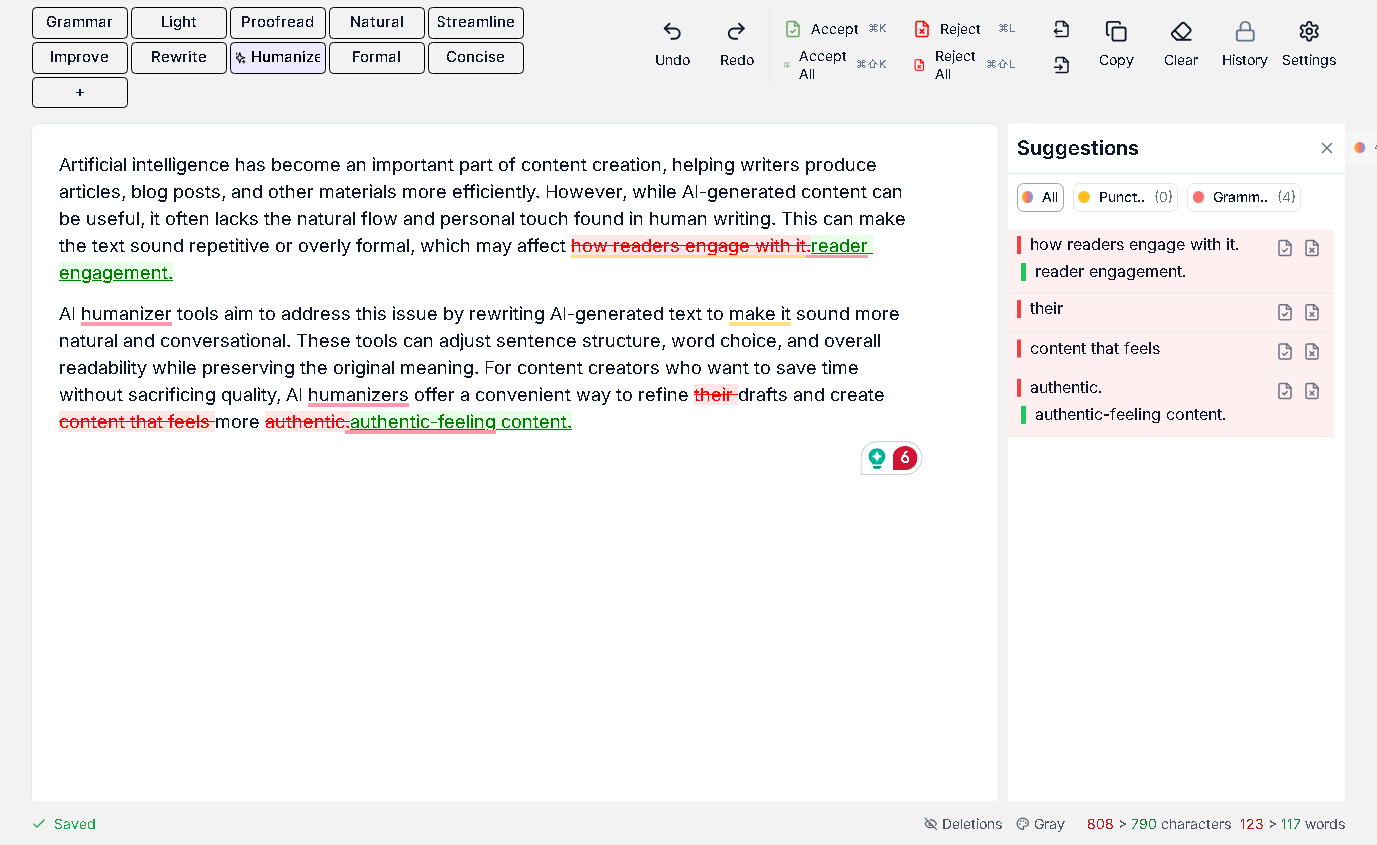
editGPT edits in place instead of regenerating.
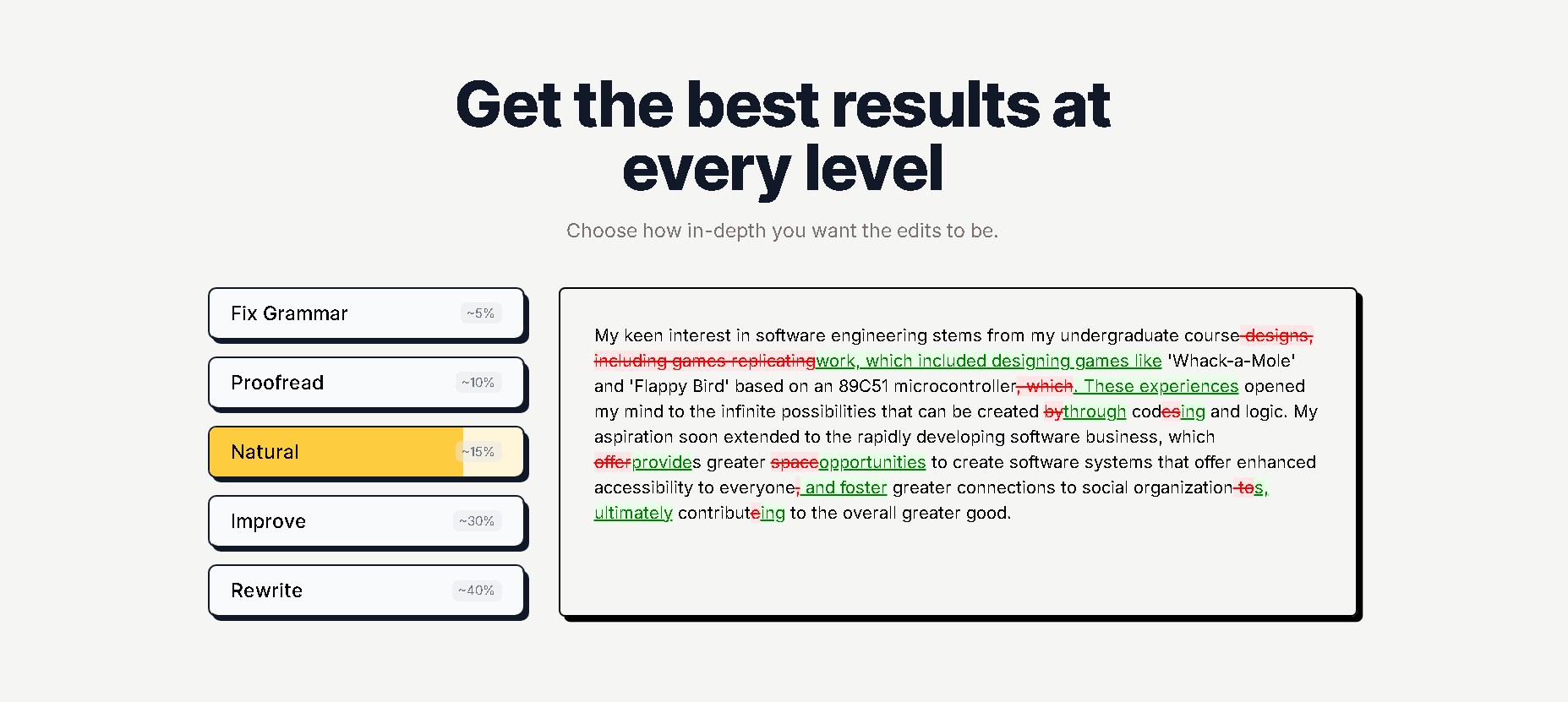
A typical bypass tool takes your paste and returns a new block. editGPT keeps your text where it is and shows which sentences changed, with deletions in red and additions in green, so you can accept or reject each one.
Getting started takes a few steps. Upload a file or paste your draft, then pick a one-click edit: Grammar, Light, Proofread, Natural, Streamline, Improve, Rewrite, Formal or Concise.
If none of those fit, write your own custom prompt. The suggestions come back as tracked changes for you to review one by one.
For flagged text, Natural is the edit we’d reach for. It varies sentence length and rhythm and reorders clauses, so AI-sounding passages read the way a person would write them. If a change drifts from what you meant, reject it and keep your wording.
Problems like the stray characters reviewers report in BypassGPT output are also easier to catch this way, because they show up as a marked change instead of hiding inside a fresh block.
A simple routine pairs well with editGPT’s free AI detector. Check the text, run the Natural edit, then check it again. We’d treat the score as a pointer to which paragraphs need attention. Detectors keep changing, and no editing tool controls what they say.
Word workflow, Chrome extension and languages
Word support comes with the paid plans. You can import a .docx, edit it, and export it with your edits as tracked changes in Word, formatting intact. That helps when a professor or an editor reviews your work in Word.
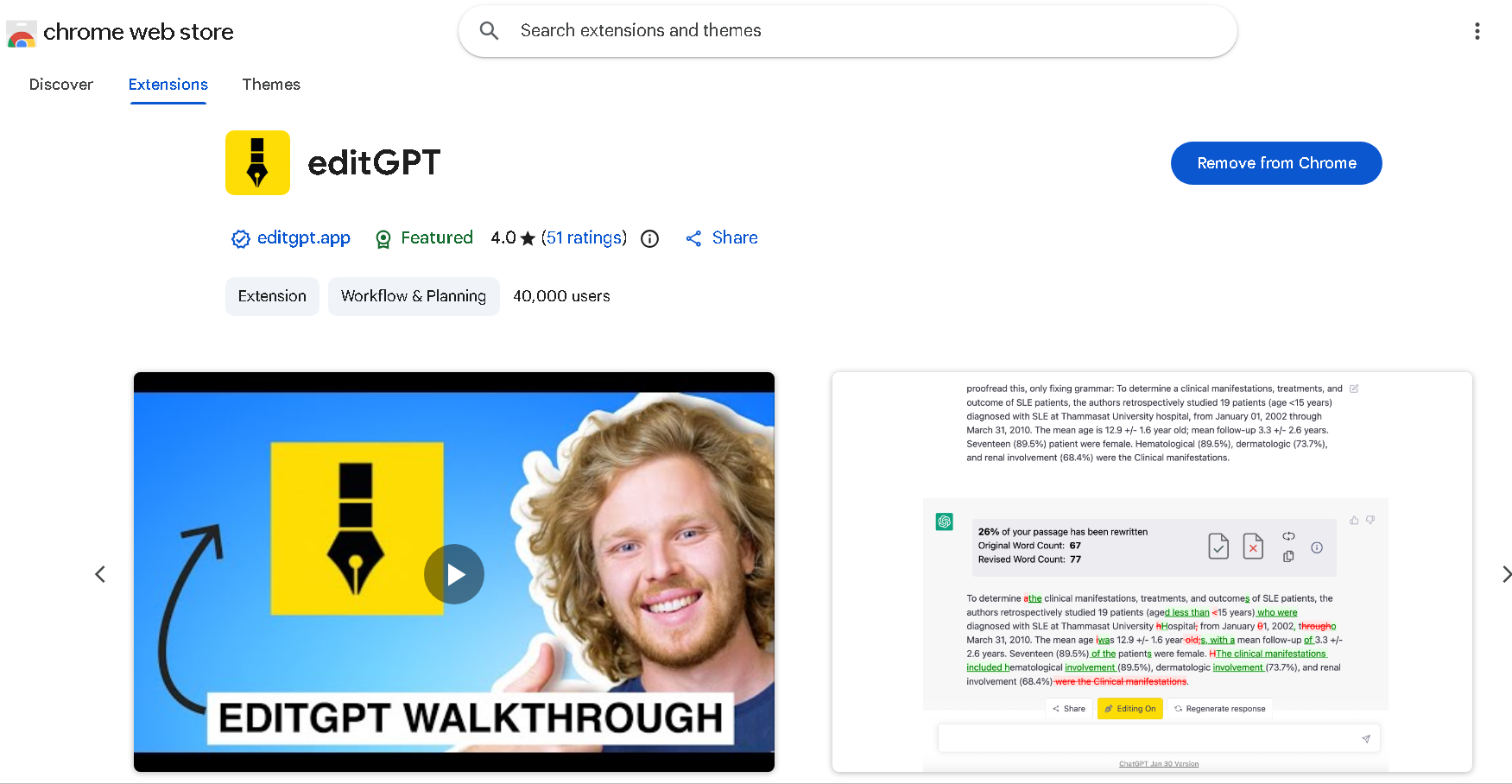
The web editor is the main workspace. There’s also a Chrome extension that adds the same accept and reject controls inside ChatGPT.
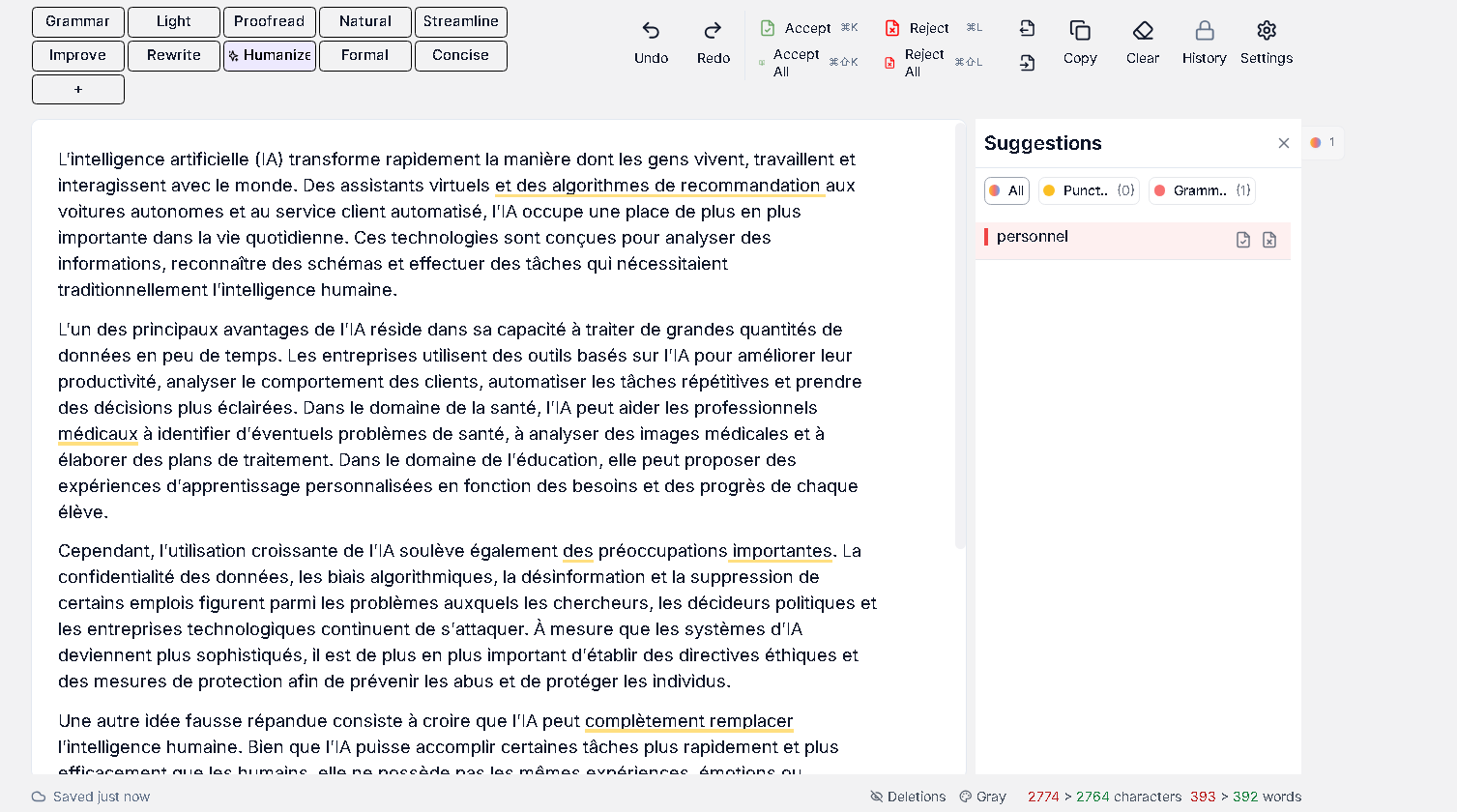
editGPT supports 80+ languages and detects the language automatically. That’s useful for ESL students, whose second-language writing tends to get flagged more often than native writing.
Pricing
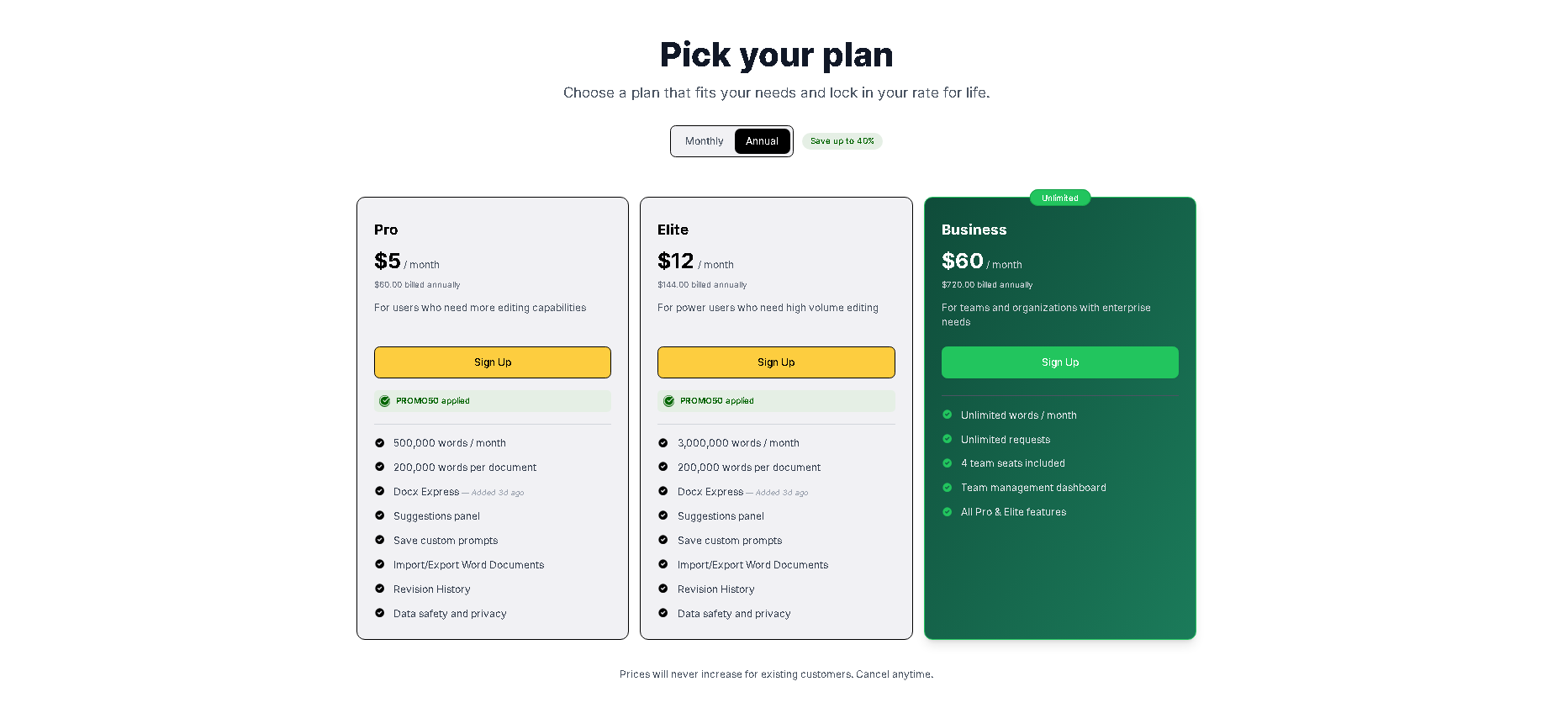
editGPT has a free plan and three paid plans, starting at $10 a month.
Pro is $10 a month for 500,000 words a month, up to 200,000 words per document. It adds Word import and export, a suggestions panel, saved custom prompts and revision history.
Elite is $25 a month and raises the allowance to 3,000,000 words a month. Business is $100 a month with unlimited words and requests and 4 team seats. Billed yearly, Pro drops to $5 a month, Elite to $12 and Business to $60.
Pros and Cons
Both tools have their strengths. editGPT’s come from control and a larger free plan, while BypassGPT’s come from speed and its AI checker.
editGPT
editGPT’s biggest advantage is that you can see and undo every change.
Pros
- Every change is visible and reversible, so you approve the final wording.
- The free plan gives you 20,000 free words, against 150 words a month on BypassGPT’s free plan.
- Paid plans handle Word files with tracked changes.
- It supports 80+ languages with automatic detection.
- Pro starts at $10 a month, compared with $12 for BypassGPT’s Basic, and includes 500,000 words a month rather than 5,000.
Cons
- editGPT is an editor, so it doesn’t promise a detector score. You get readable text you’ve approved instead of a guaranteed percentage, which is the more honest position while detectors keep updating.
BypassGPT
BypassGPT’s biggest advantage is speed: a finished rewrite in one pass, scored straight away.
Pros
- Three rewrite modes (Fast, Creative and Enhanced) come with every plan, including Free.
- There’s an Android app for rewriting on your phone.
- The Unlimited plan advertises no per-input cap.
Cons
- The refund guarantee covers 3 days and ends once you’ve used more than 1,000 words, so it’s hard to test properly before it lapses.
- The free plan is 150 words a month.
- Reviewers report that the output often needs a proofread.
Who Should Use BypassGPT
BypassGPT suits people who want a fast, one-pass rewrite and plan to review the result themselves.
Three groups tend to fit:
- Anyone short on time: If you have a block of AI text and want a finished rewrite back in one pass, BypassGPT delivers one without any back and forth.
- People who like to compare modes: Fast, Creative and Enhanced come with every plan, so you can try all three on the same short passage before you pay.
- Heavy users: The Unlimited plan advertises no per-input cap, which suits long documents and high volume.
Who Should Use editGPT
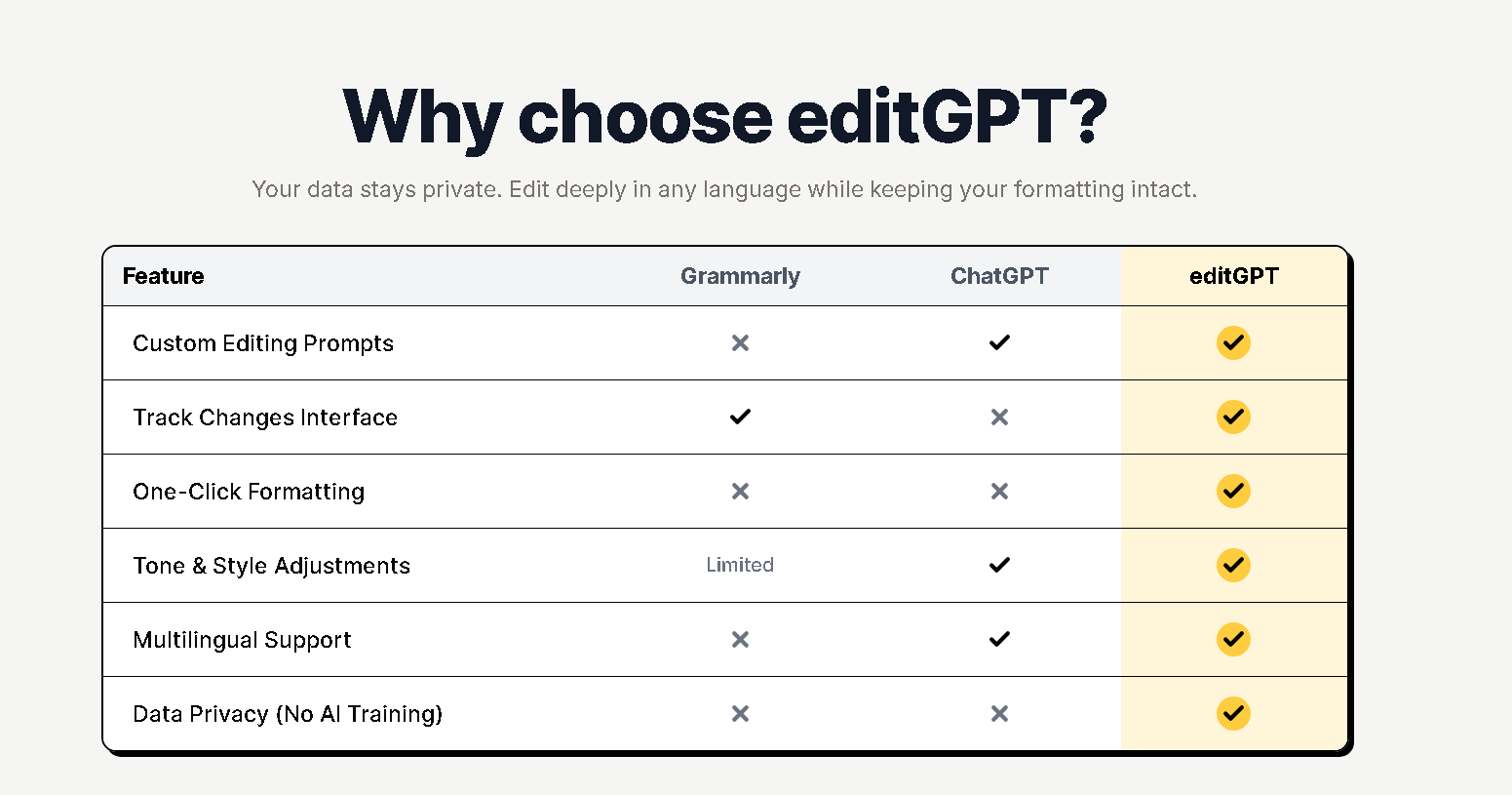
editGPT suits people who have to stand behind the final text and want to see how it got there.
In practice, that comes down to four groups:
- Students and academics: If your name is on the paper, you need to know what every sentence says and why it changed. Each edit is marked, so you can check it against your argument and your sources and reject anything that shifts your meaning. It also gives you a clear record of what changed if you’re ever asked to explain your edits.
- Writers and marketers publishing under their own name: What matters here is voice. A rewrite that comes back as a fresh block can smooth out the quirks that make your writing recognizable. With tracked edits, you keep the phrases you like and take only the changes that help.
- ESL writers: If English is your second language, or you write in another language entirely, editGPT supports 80+ languages and detects which one you’re using. You get natural phrasing, and your own wording stays visible instead of disappearing into a full rewrite.
- Anyone who works in Word: On the paid plans, you can import a .docx, edit it, and export it with the changes saved as tracked changes and your formatting intact. Anyone who reviews the file afterward can see exactly what changed.
If moving a number on GPTZero is the only goal, a dedicated bypass tool such as BypassGPT is aimed at that job, and the trade-offs covered above still apply. For writing that carries your name, go with editGPT.
FAQ
Is BypassGPT free?
BypassGPT has a free plan with 150 words a month and 80 words per input as of November 2026. That’s enough to try one short paragraph.
Does BypassGPT really work?
Results are mixed. Independent testers report that stricter detectors still flag some of its output, and reviewers say it can leave errors that need proofreading.
Is BypassGPT legit and safe?
BypassGPT is a real, paid product with a working web app. Read its refund policy before you pay: refunds must be requested within 3 days of purchase and aren’t available once you’ve used more than 1,000 words.
Is it possible to get 0% AI on Turnitin?
No tool can guarantee 0% AI on Turnitin, because Turnitin keeps updating its detection model, including an August 27, 2025 update aimed at humanizer tools. The safest route is writing and editing the text yourself with every change visible.
Is it safe to use an AI humanizer on schoolwork?
Policies differ by school and instructor, so check yours before you submit anything. A tool that shows every change, such as editGPT, makes it easier to explain your final text.
Final verdict
If you’re editing your own writing and need to see and approve every change, editGPT is the stronger pick. Your text stays in your hands, and each edit is marked. Word support comes with the paid plans.
BypassGPT has real strengths, too. All three rewrite modes come with every plan, and the Unlimited tier suits heavy users. It’s the quicker route when moving a detector score is your only goal.
editGPT is built to edit, not to bypass, so it doesn’t promise a detector score. What you get is text that still sounds like you, with every change checked by you.
And that’s what we’d want on anything that carries our name.
To see how it handles your own draft, try editGPT free.
Recommended Reading
7 Best Tools to Bypass AI Detection in 2026 (Ranked by How Human the Output Actually Reads)
7 Best Tools to Humanize ChatGPT Text in 2026 (Tested for Natural, Undetectable Writing)
7 Best ZeroGPT Humanizers in 2026 (Tested & Ranked for Writers)
editGPT AI Proofreader: Features, Pricing & Who Should Use It
editGPT Extension vs Web App: Best Choice for Serious Editing
